
OPORTUN • B2C FINTECH • 2025
Oportun's loan servicing platform
TIMELINE
4 months
ROLE
Product Designer (Me!)
TEAM
Design Manager
Product Managers
Developers
Tl;dr
Oportun serves 2.2 million people with limited or no credit history through personal loans. Support costs were climbing because the product did not answer basic questions about payments, balances, and offers. About 116,000 calls a month came from roughly 800,000 active loan members. I was the only product designer for online servicing. I mapped loan states, reworked payment and loan-detail flows, and advocated for transparency forward design.
↑ 395%
Feature discoverability
↑ 64%
App logins
↓ 29%
Customer calls
SOLUTION
Here are some of the key flows
Contextual payment widget
Members can access current loan information with a single click from the home page, with relevant details displayed based on the user's loan lifecycle stage.
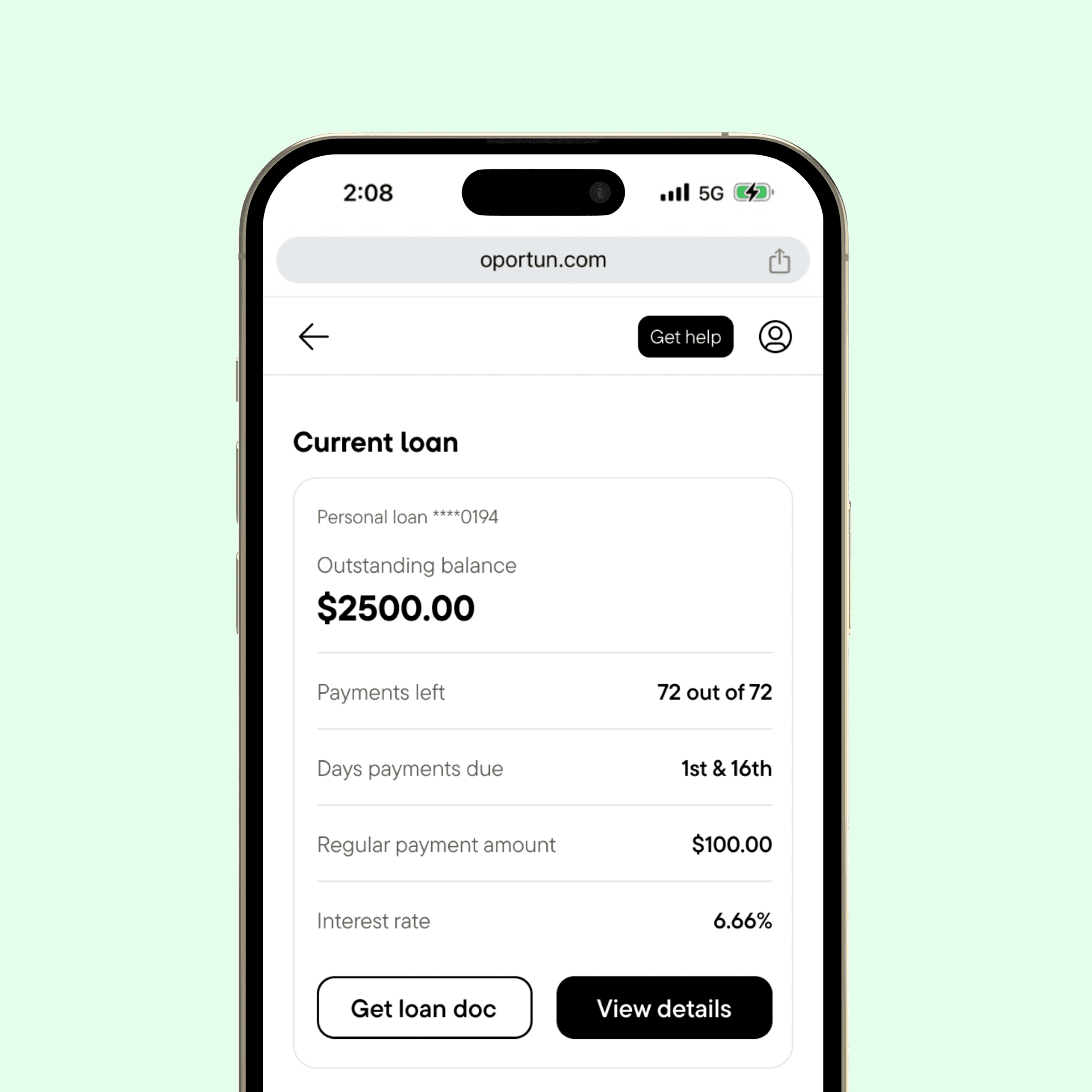
Leading with transparency
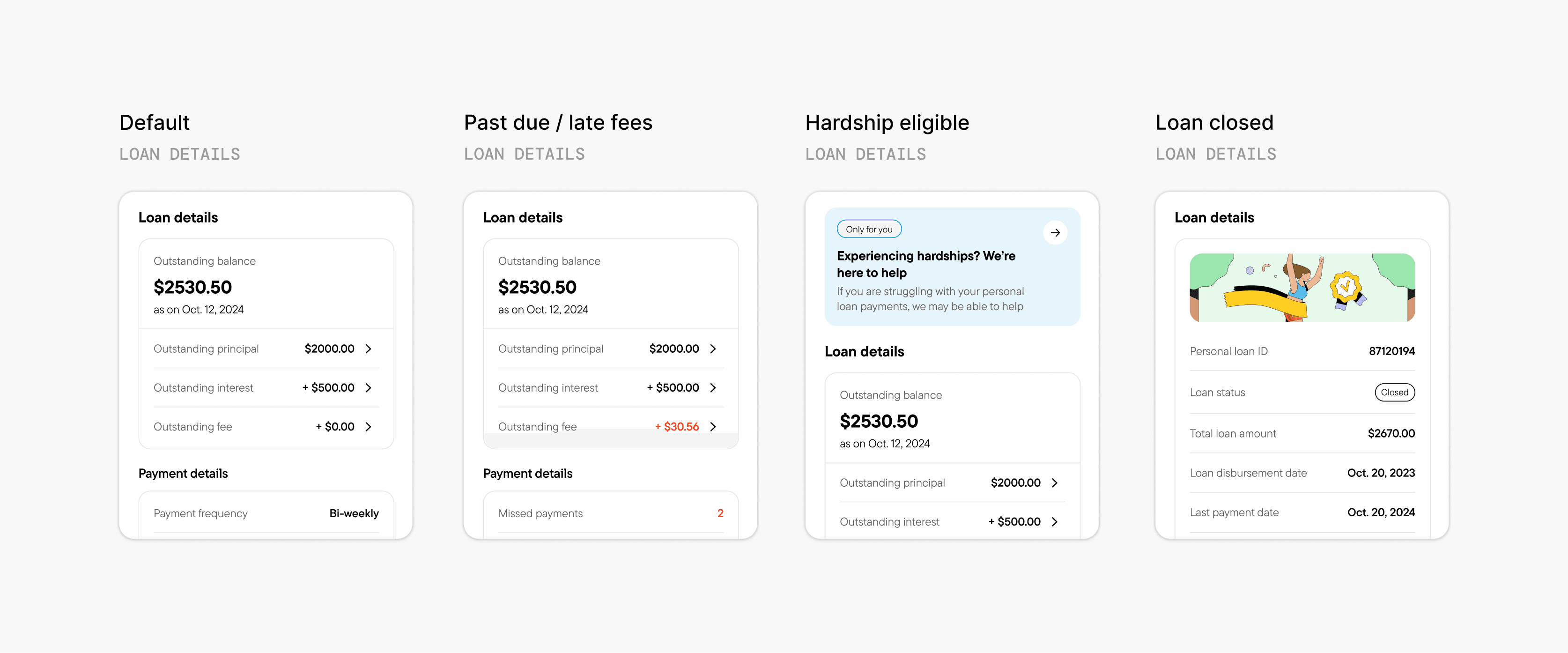
Loan details lead with glanceable information, then progressively disclose more information when a user needs it. Unfamiliar jargons link to more explanation. Everything changes real-time when payments post or fail.
Easy access to payment receipts
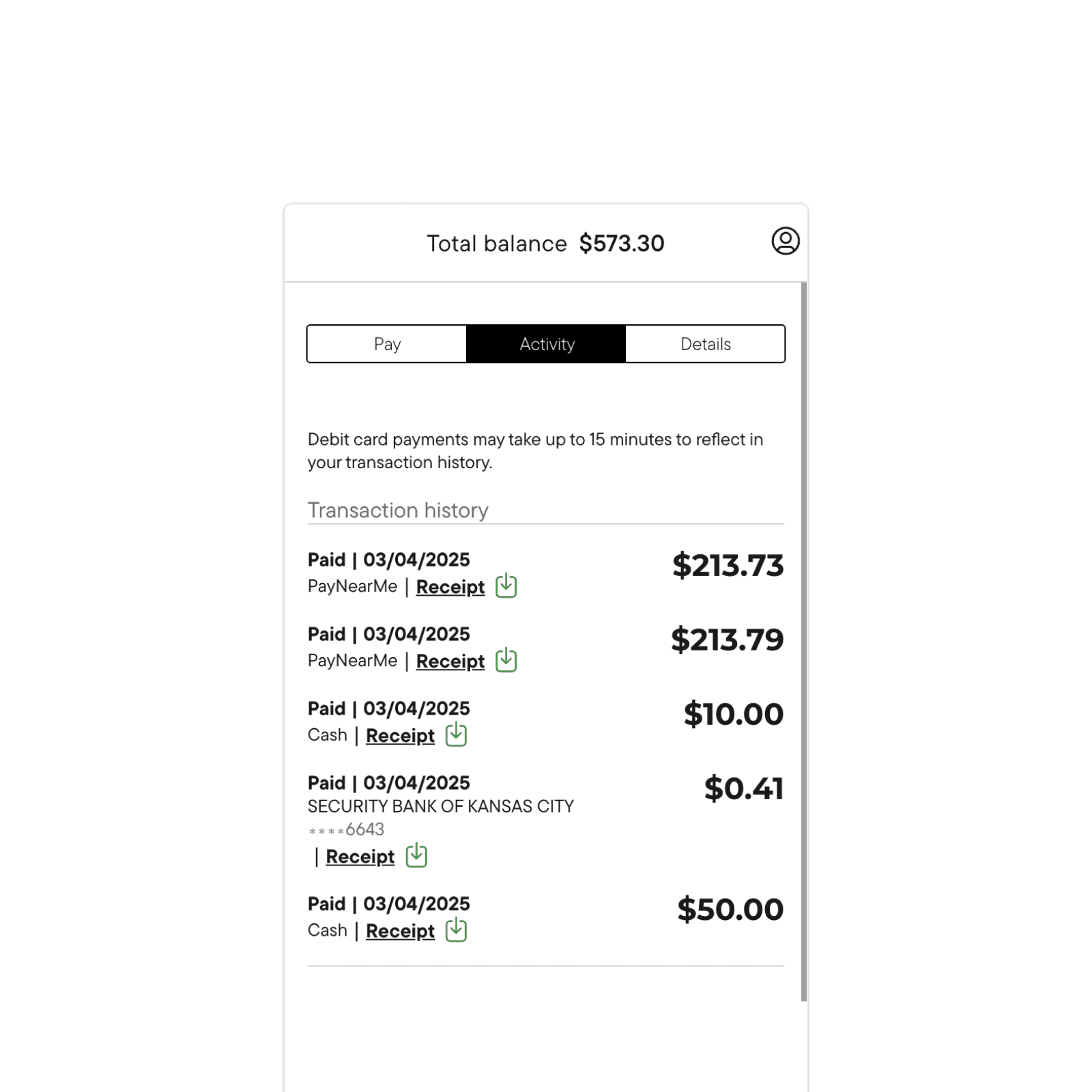
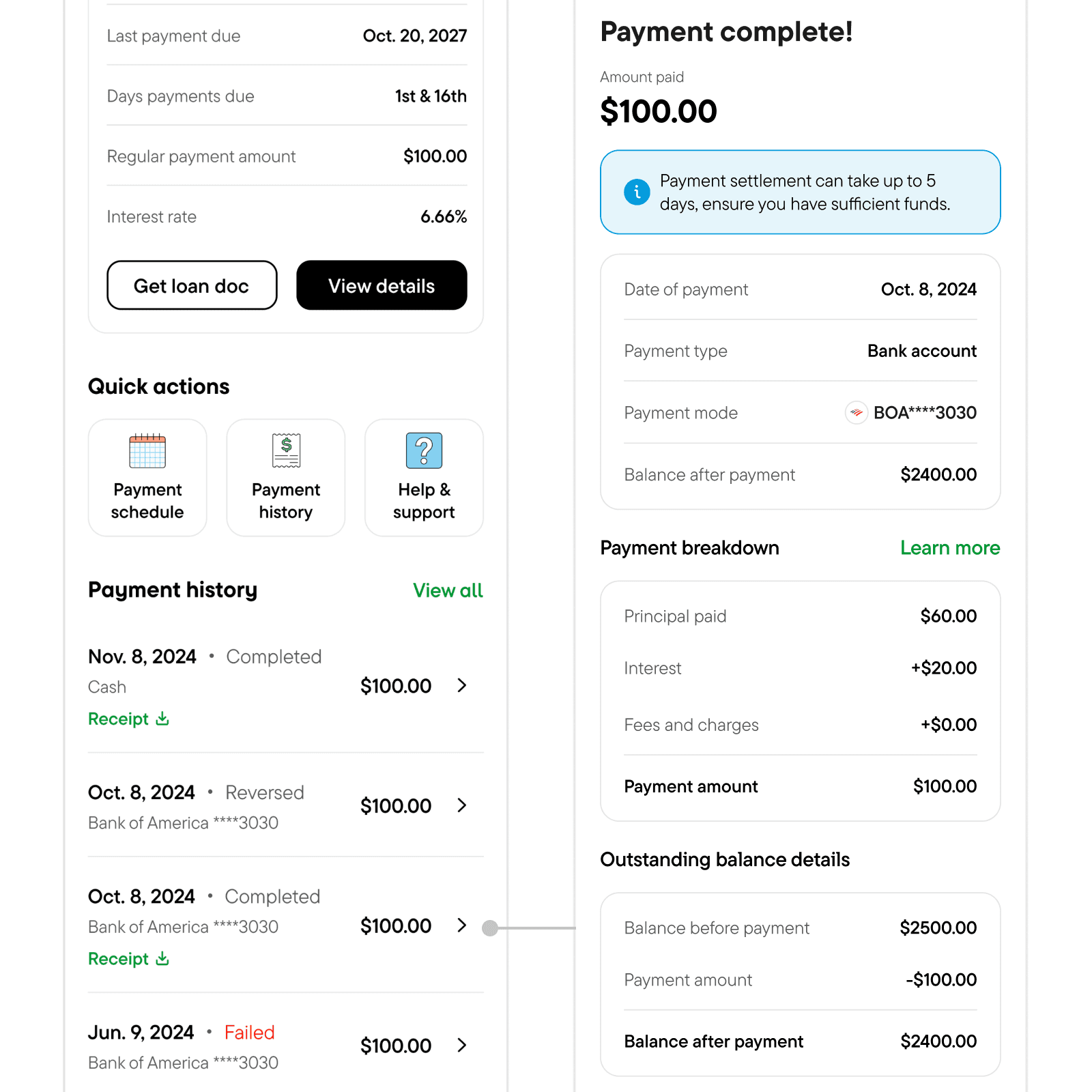
Receipts in the app and for download use the same section structure as the payment confirmation: amount, allocation, remaining balance. Members do not need a call to interpret what they paid and what the balance is.
OVERVIEW
Oportun is a fintech company focused on serving individuals with limited or no credit history.
Oportun is a fintech company focused on serving individuals with limited or no credit history. They offer personal loans, credit cards, and a savings app. The company is public (NASDAQ: OPRT) and serves about 2.2 million members today.

PROBLEM
Operational costs are rising due to heavy reliance on support calls.
Self-serve exists on web and mobile, but most of the ~800,000 active loan members still call support, about 116,000 times each month. That habit costs money and correlates with delinquency.
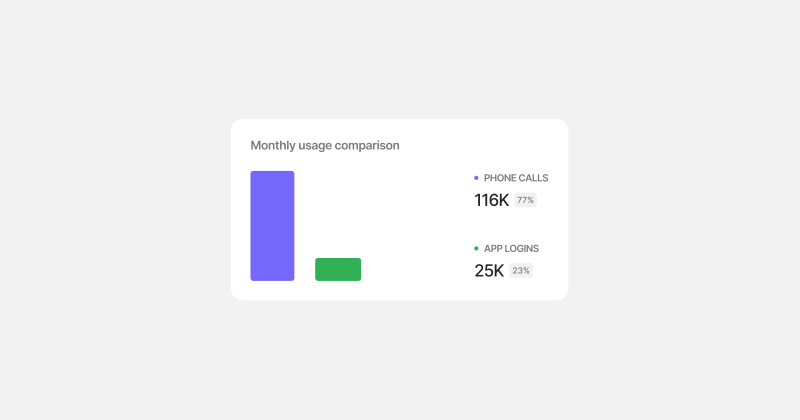
This reliance contributed to increasing delinquency.
Members reach out when they are not sure what they owe, whether a payment posted, or if they qualify for hardship or renewal. If the app does not answer those questions when they need them, people wait, pay late, or stop using self-serve.
INITIAL FINDINGS
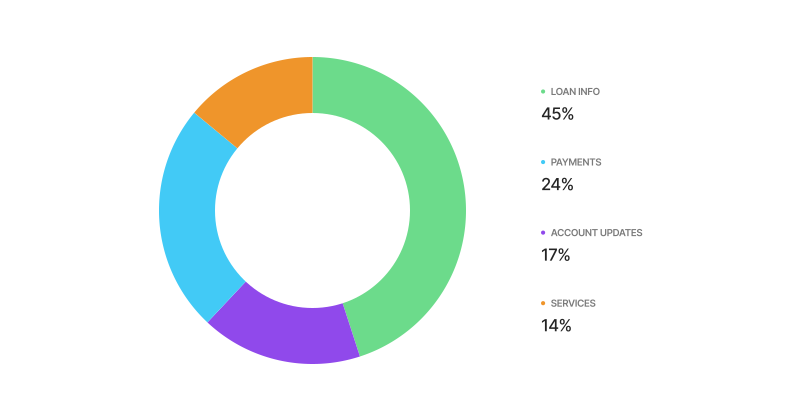
The data shows that members primarily call about payments and loan information.
My first instinct was to understand why users felt the need to call. Money is sensitive, and some level of caution and distrust in digital systems is normal. But the volume of calls signaled deeper issues in the product that were undermining trust. Using Cresta, our internal tool where agents log customer calls, I partnered with data analysts and PMs to dig into the call data and categorize the reasons for reaching out. The top drivers were loan and payment information.
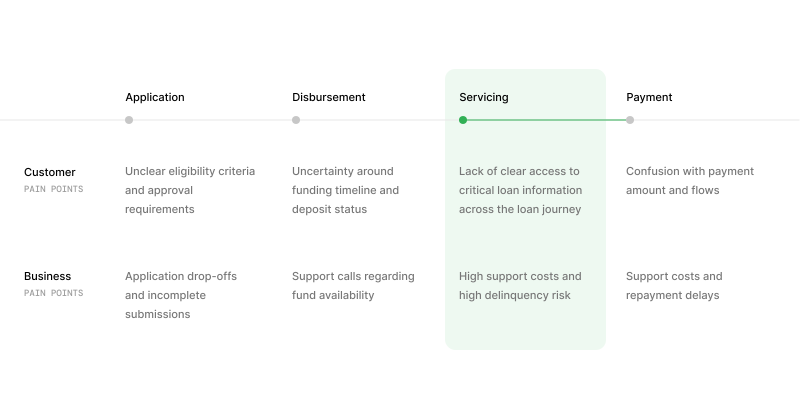
But why Online Servicing? Why not other touch points?
Servicing is where member confusion and business cost overlap. Application and disbursement matter at onboarding, but most of our 800k active loan members live in servicing day to day. Payment pain showed up in the data too, but it sits inside servicing: people call because they cannot find balances, fees, or eligibility in the product, then miss or delay payment.
Users preferred to go mobile first on Online Servicing web
Online Servicing runs on desktop web, mobile web, and the native app. We did not try to fix every surface at once. Login data showed members already checking balances and making payments on mobile web, so that is where we started. The web experience had also fallen behind the app on design, and new UI had to ship on the JavaScript stack the team was moving to. Mobile web let us reach the most members while closing both gaps.
Active users
Most app logins for servicing came from mobile web.
Outdated designs
Web patterns, copy, and components did not match the latest design system.
Codebase transition
New UI had to ship in the JavaScript stack so it could live beside the app and share components with native.
GOALS

Help users find important information
User goal
Reduce overhead costs and build trust
Business goal

Help users pay their bill on time
User goal
Reduce delinquency
Business goal

Make taking loans a smooth experience
User goal
Retain good users and repeat customers
Business goal
DESIGN PROCESS
Working my way down, thinking from a high level structure…
I started with information architecture and the home hierarchy, then moved screen by screen into payments and loan details. The working principle was transparency forward: show the number first, then explain how we got to it.
Finding areas of improvement in the current experience and trying to be 'transparency forward' during the iterations.
I compared the live mobile web flow to support call reasons and walked each path the way a member would. When something felt off, I wrote down what was missing: a number that changed between screens, a fee with no label, an offer hidden below the fold. Those notes became the list of fixes.
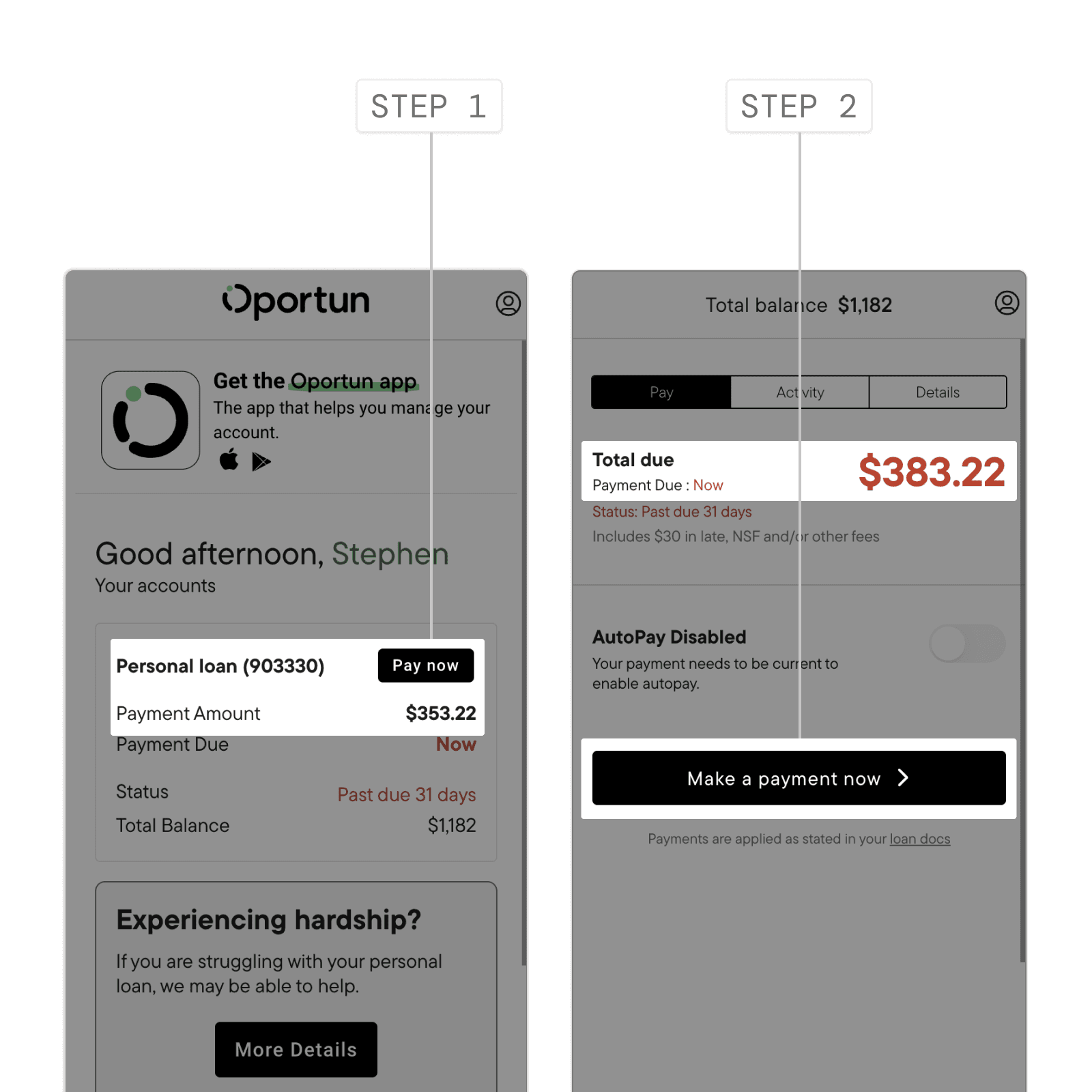
BEFORE
Multiple clicks to get to the payment screen and even then, the payable amount is inconsistent.
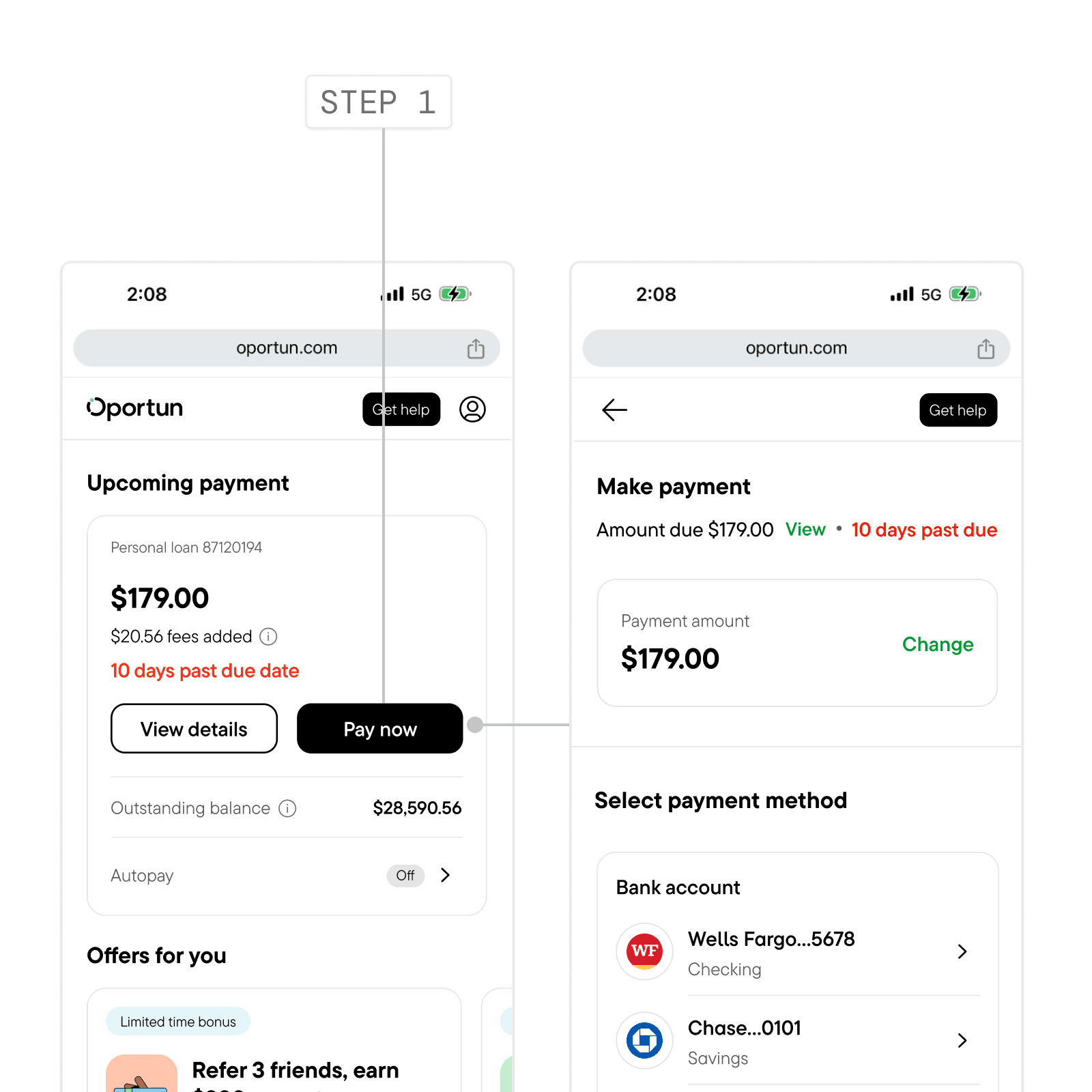
AFTER
Single click to get to the payment screen and the payable amount is clear and consistent across.
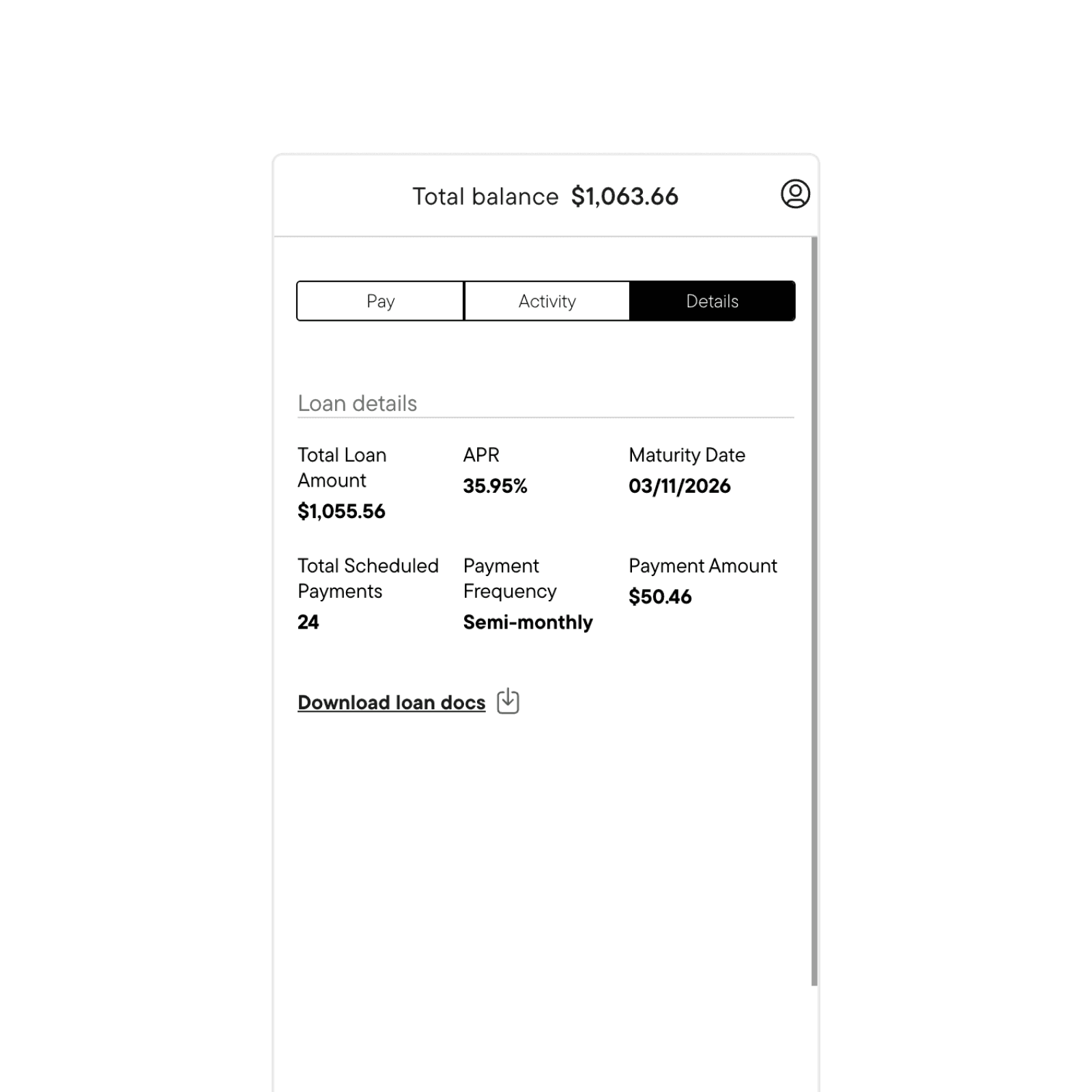
BEFORE
Important loan information are static and buried deep in the experience with no clear understanding of complex jargons and numbers.
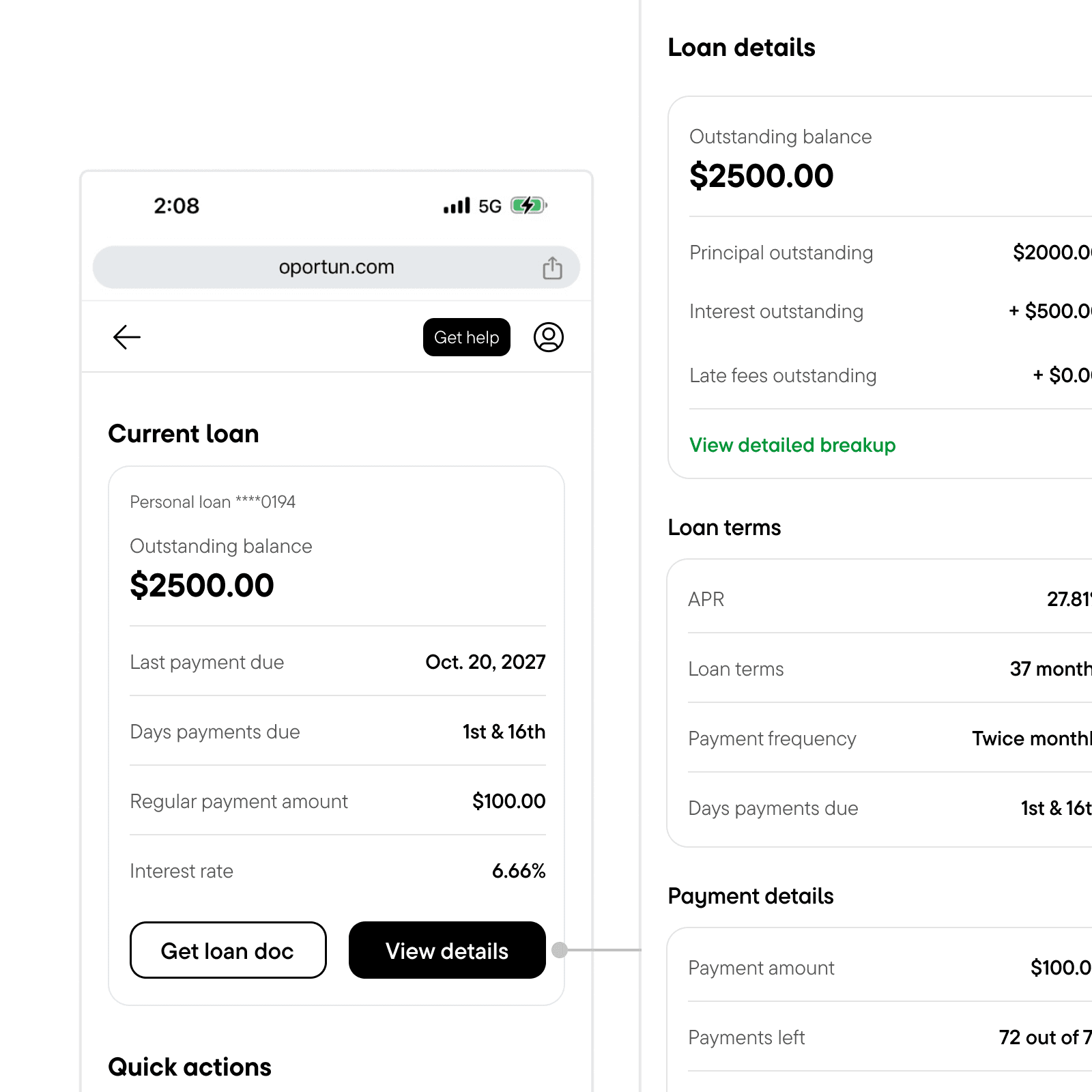
AFTER
Loan information are upfront with understanding of complex jargons with easy breakdown of numbers with real-time updates.
BEFORE
Receipts that users downloaded before were static PDFs that was filled with jargons.
AFTER
Current receipts are easy to understand and broken down into contextual sections.
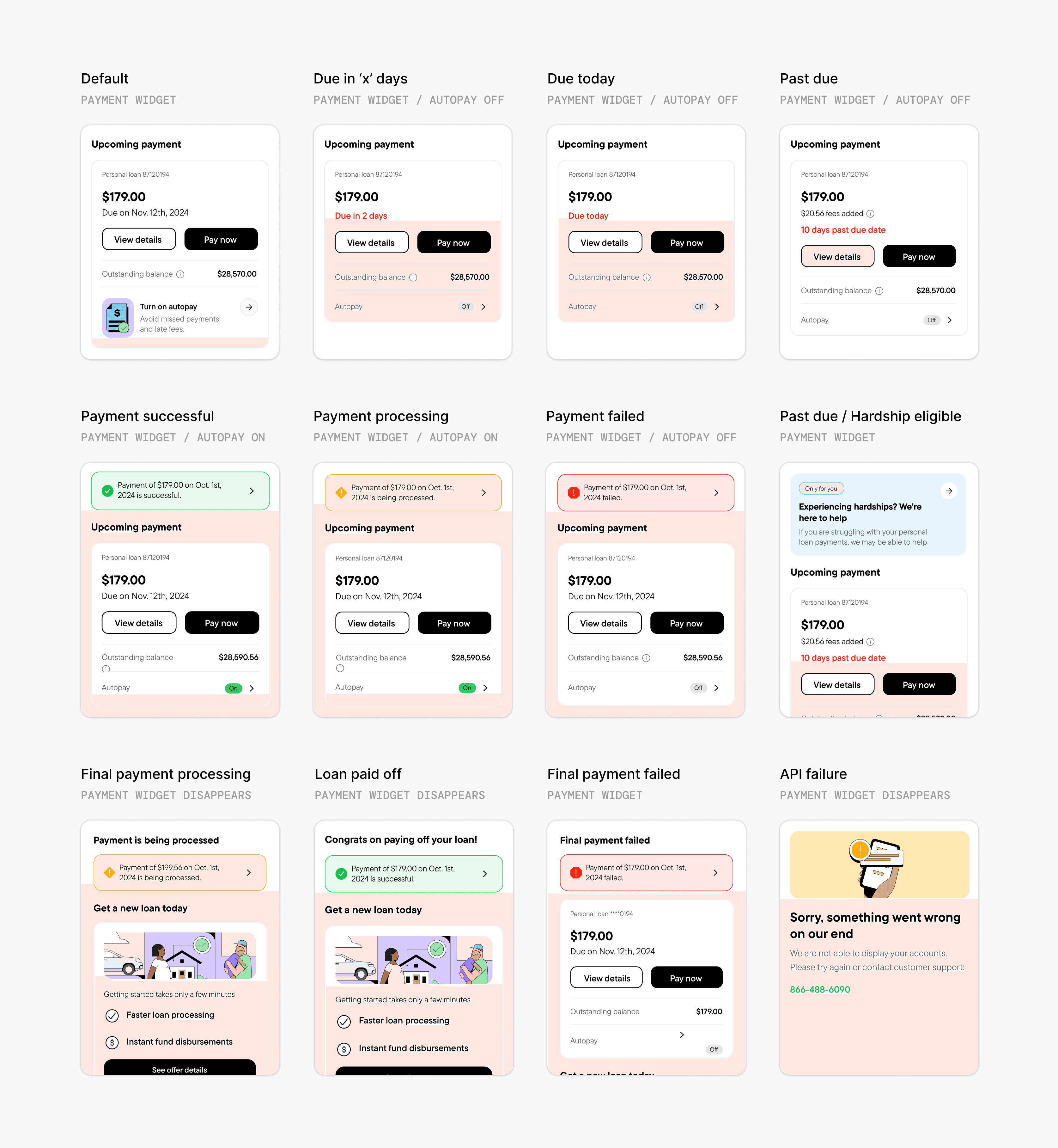
Building out a payment widget with multiple states and edge cases.
I mapped out the user journey from start to finish for the main payment widget, considering all possible user states that could impact loan and payment details. I focused on identifying relevant information to display at a glance and how it would vary across different user states. For example, a member who has missed a payment would likely want to see if any late fees have been applied and how they are calculated.
I did the same for the loan details widget, except the use-case there was different. I used a lot of progressive disclosure to make sure the information isn't overwhelming and would surface only when the user wants to dive deep.
Finally, the first version was ready for cross-team review.
I mapped every loan state that changes what someone sees: current, past due, hardship, paid ahead, paid off, and the edges in between. Each state got three screens. Home is the snapshot. Loan details is the summary. Extended view is the full breakdown. When the set was complete, I took it to PM, engineering, and design.
Getting stakeholder buy-in
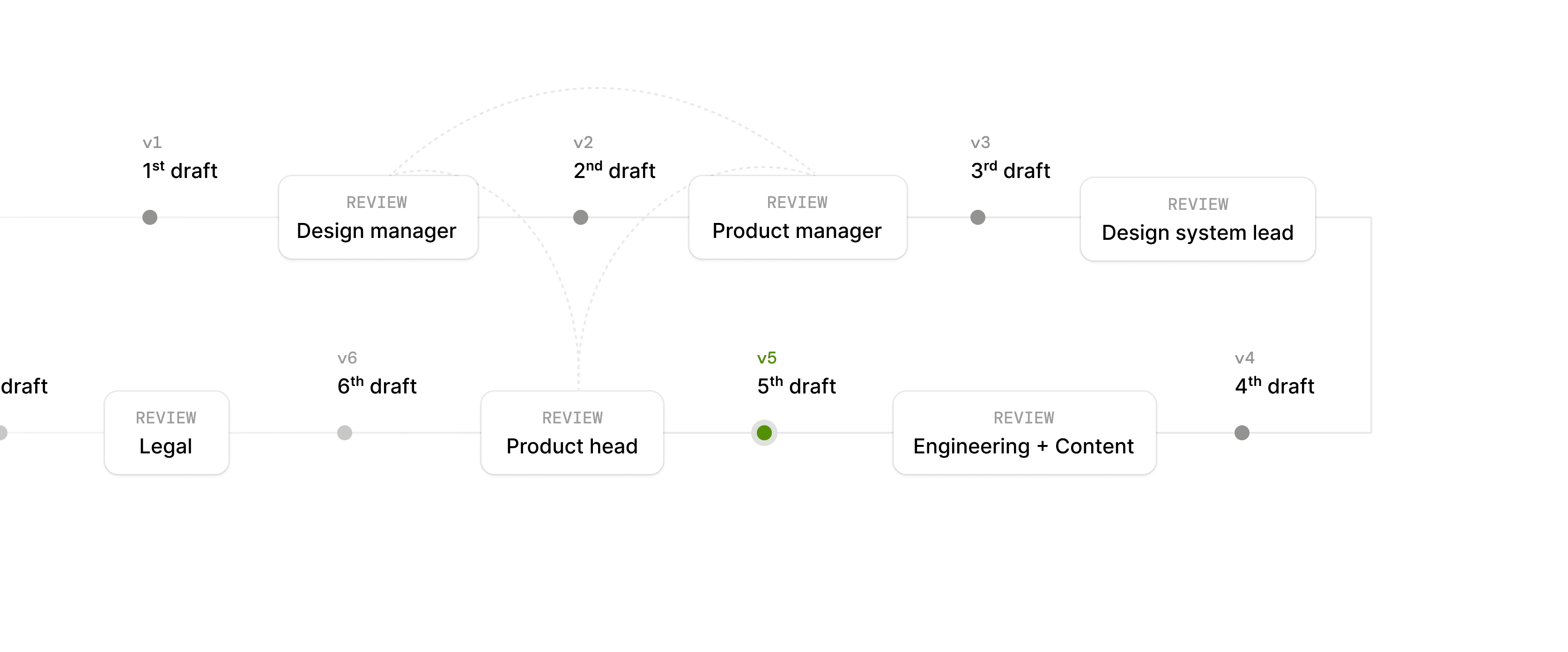
Reviews and rounds of iterations are hard, but they are key to turn stakeholders into advocates for our work. I knew it was crucial to listen and address concerns, without forgetting we had to be assertive about some of the design direction we chose, and showing the value in our design direction.
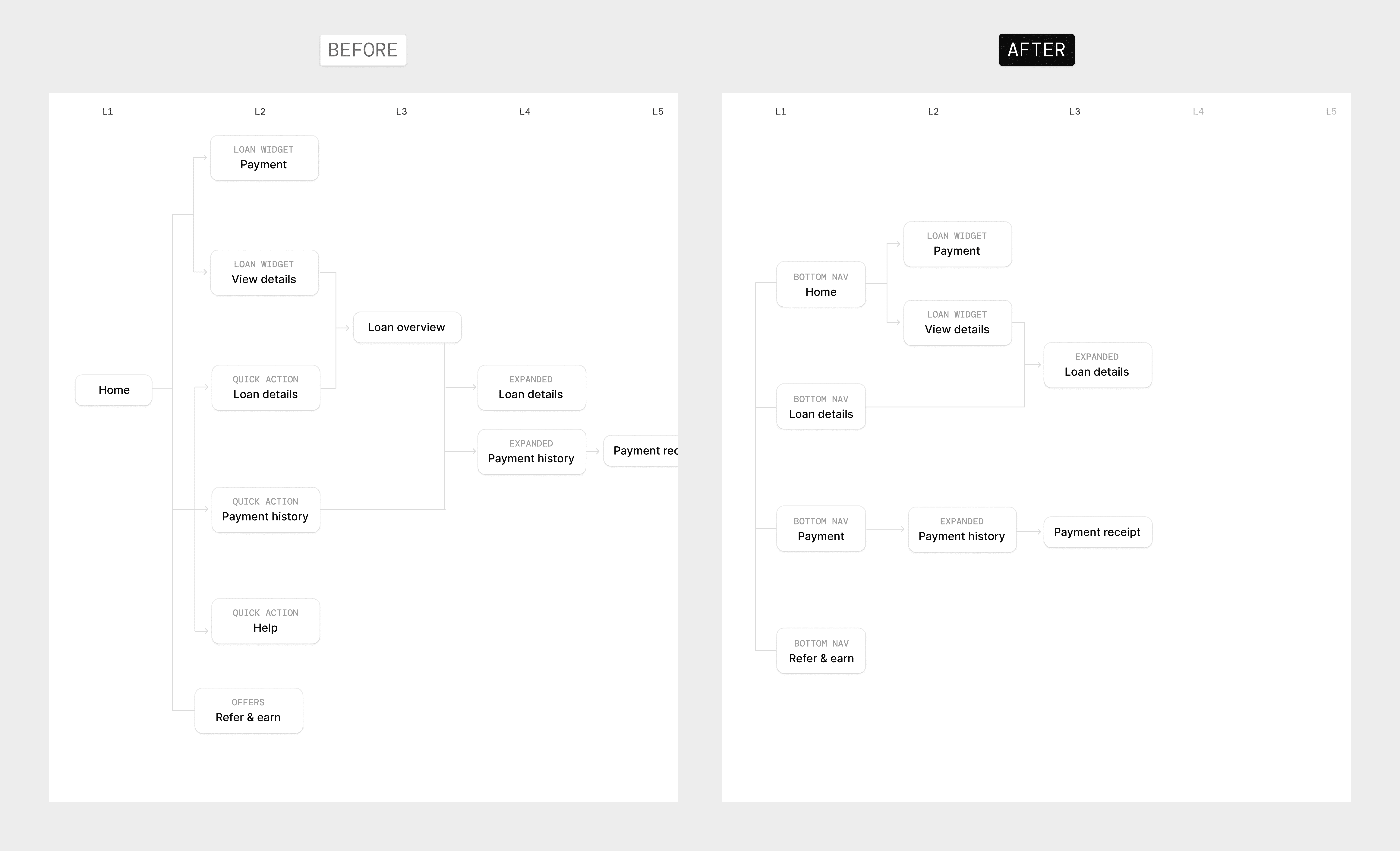
One way I get buy-in is by showing the direct value and speak to the stakeholders directly. I showed the Head of Product simple before / after of how simple the app architecture got after the changes and she immediately reacted positively.
DESIGNing WITH CONSTRAINTS
API limitations forced me to rethink the design again.
I designed for full breakdowns: principal, interest, past due, late fee, each with a label and a short explanation. Not every field had a reliable API source. We cut what we could not confirm, logged the missing events with engineering, and kept the UI from looking broken where data was absent.

BEFORE
By design, numbers were meant to be broken down progressively so members weren’t left in the dark.

AFTER
Several fields had to be removed due to the absence of events and API data limitations.
DESIGN SYSTEM
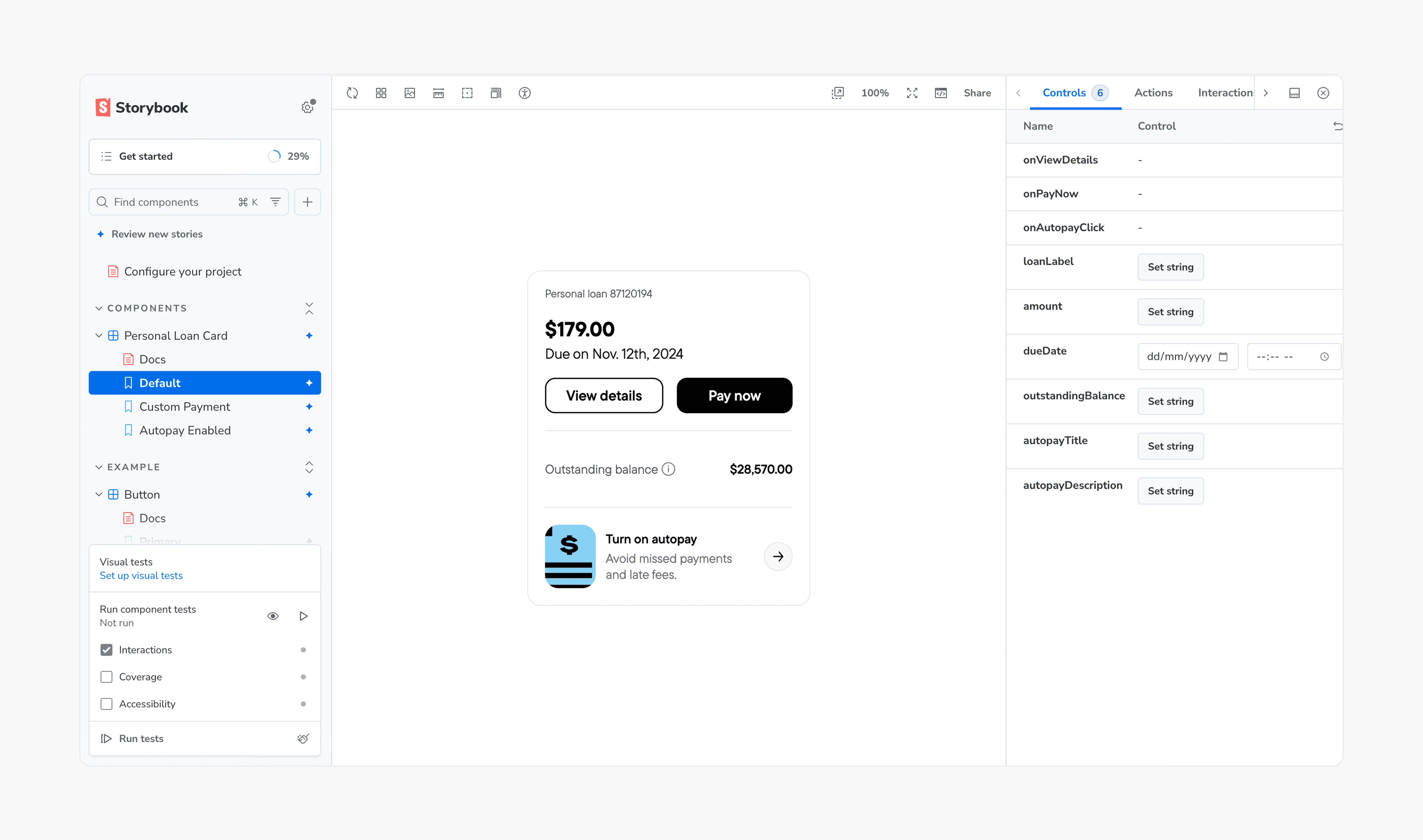
Adding new reusable components and documentation to Storybook.
I added payment module variants, loan status chips, and receipt sections to Storybook with usage notes so implementation matched the system the app already used.
QA & TESTING
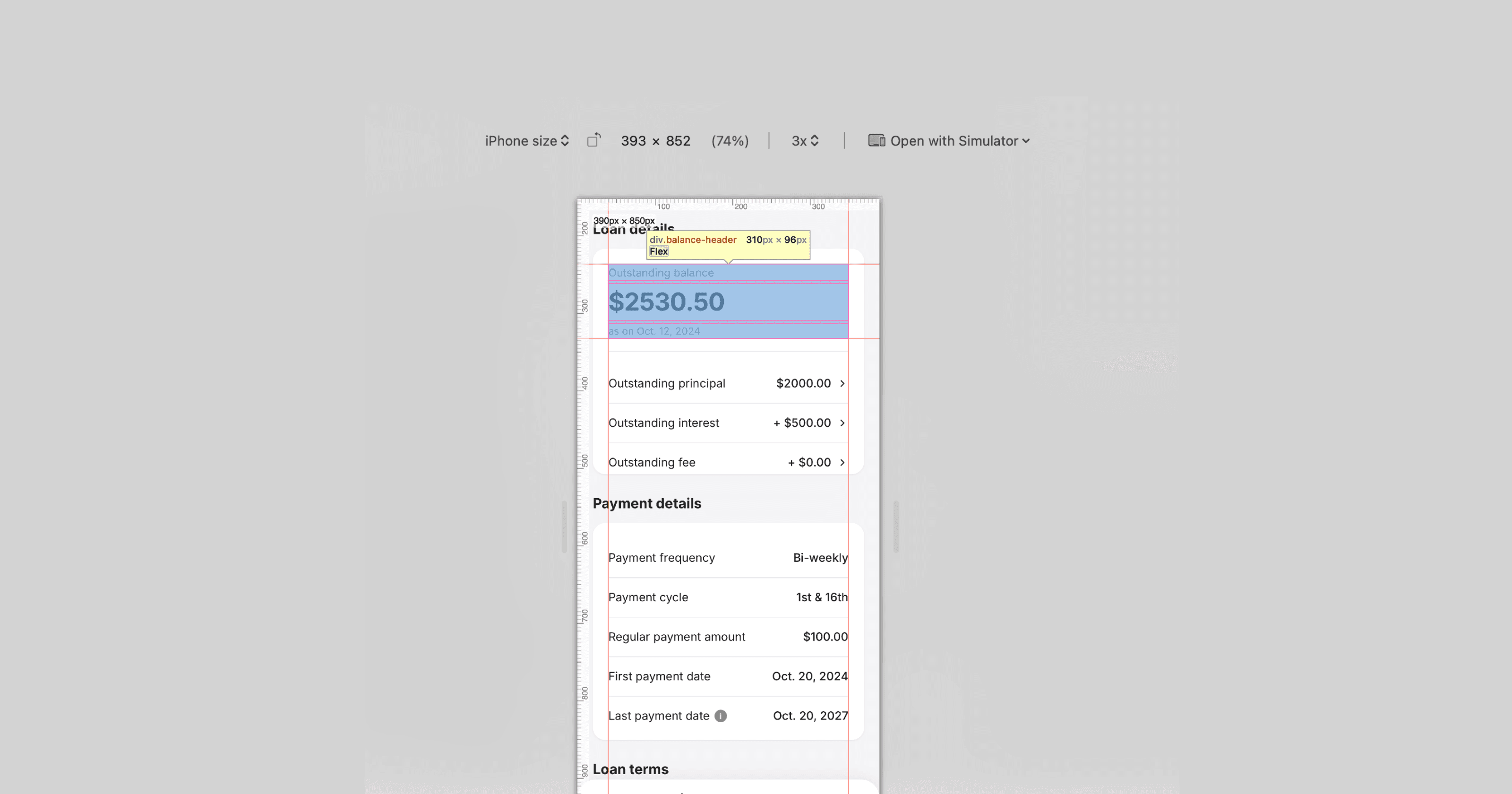
I tested multiple simulated user accounts in staging and evaluated design specifications across various mobile screen sizes to be sure.
I tested staging accounts for each loan state and checked layouts on common iPhone and Android widths. We fixed truncated copy, misaligned amounts, and wrong empty states before the limited rollout.
We launched the new version to 15% of the user base to test the waters…
Renewal signups and hardship CTRs reached a new low right before the launch
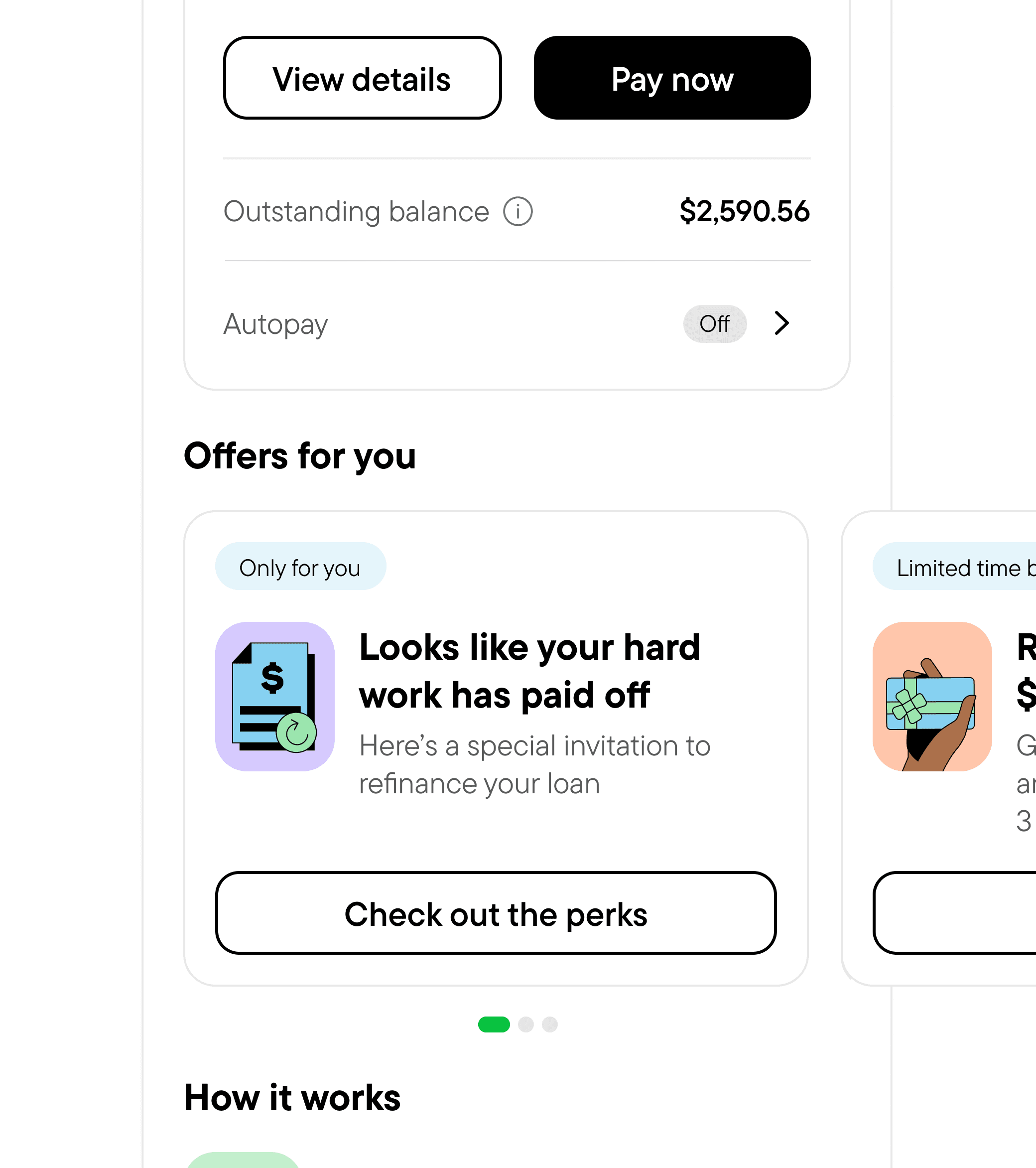
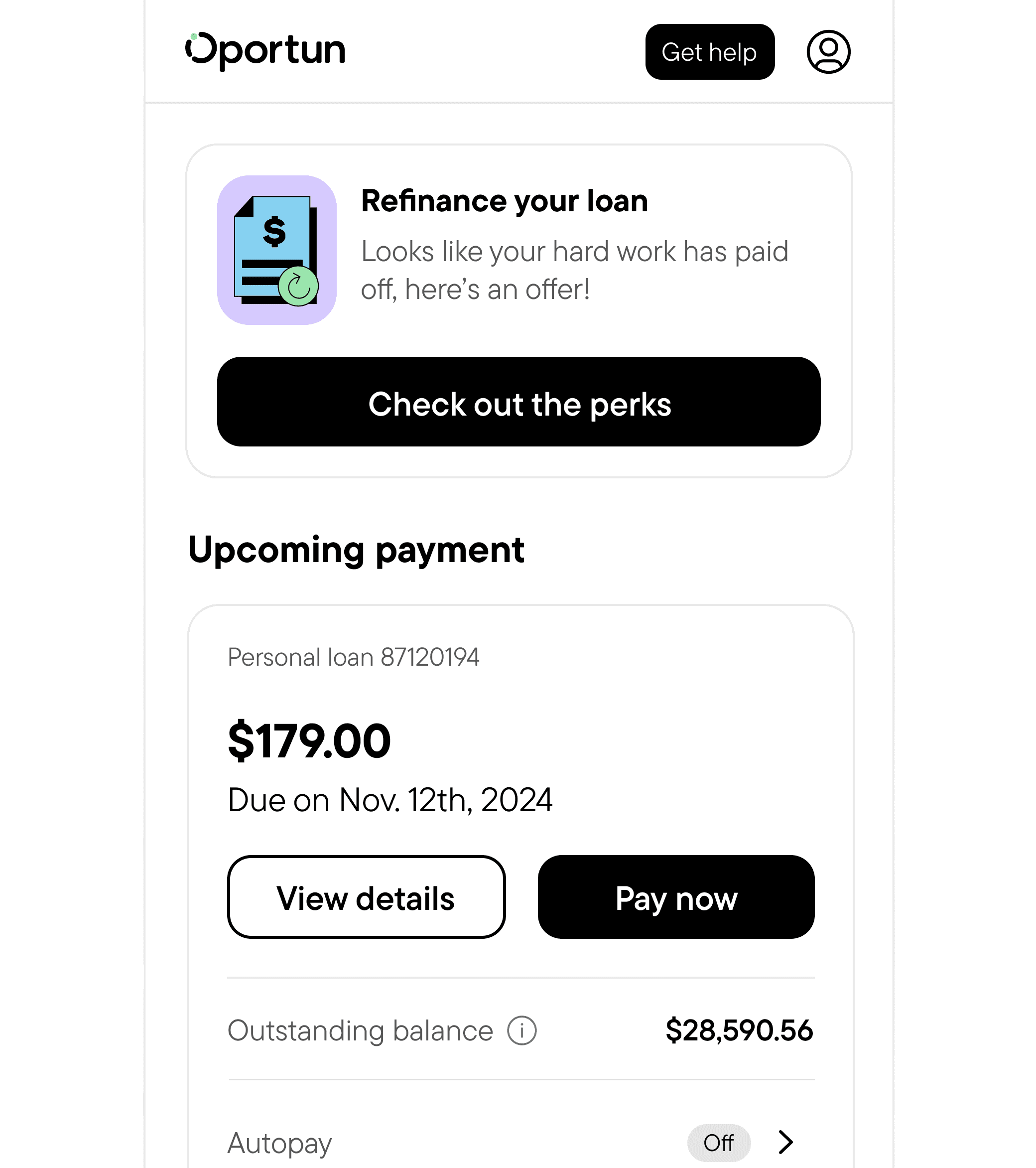
We launched to 15% of members first. Right before that window, renewal signup and hardship click-through had slipped. Offers were buried in a carousel. We moved renewal and hardship into fixed slots on home.
8% → 21%
Bringing key offers out of the carousel and placing them at the top of the fold.


2.1% → 3.6%
Making sure the hardship cards remain visible in the first fold.
OUTCOME
Impact 1 month post launch!
↑ 395%
Feature discoverability
↑ 64%
App logins
↓ 29%
Customer calls

We also won "America's Best Customer Service in Financial Services" in 2026.
REFLECTION
My key takeaways and learnings!
State mapping early saves rework
Home, loan details, and extended view each needed their own read for current, past due, hardship, and the rest. Doing that before pixel polish meant fewer surprises in review.
Data is a design brief
Call reasons told me what to fix first. I stopped guessing at pain points and started mapping screens to the questions members were already asking.
How would I do differently now with AI?